Saturday, February 6, 2010

Week 4 - Microsoft Surface


Properties of Microsoft Surface

1. Product in which users can manipulate digital content


2. Has direct interaction – no need for a mouse or keyboard, just direct touch (see above)

3. Has gesture recognition – it can follow you when you drag fingers etc

4. So you can “dip” your fingers in a palette to “paint”


5. Has object recognition – you can place cups, cards etc (see above)

6. For example, at a restaurant, the Surface can offer you more food choices based on the food that you have already placed on the table

7. Or, you can just drop a credit card on the table to pay for food!

8. Has multi-touch contact – can respond to up to 52 touches at a time


9. Therefore is also multi-user (see above! that's MANY hands on the same surface)

10. Currently, only 11 countries are developing applications for its interface

11. Customers are hospitality businesses, retail, military etc

12. Costs between $12,500 - $15,000 per developer unit

13. Microsoft hopes to make cheaper consumer versions soon

14. It’s already featured in one of my favourite shows – CSI Miami! =D


What I think about Microsoft Surface

1. I am certain that it will be well-received. "touch" interfaces will probably completely take over "non-touch" interfaces within the next few years, so Microsoft Surface will probably be set as a benchmark for the entire industry in future.

2. It will appeal greatly to commercial users, because it's VERY convenient. Hotels, restaurants etc will save a lot of money because they no longer have to hire as many service staff.

3. It will probably be very popular in the manufacturing industry as well, as it can help to provide a more holistic view of prototypes before they are made. (Remember how Tony Stark made his Ironman suit in the Ironman movie?)

4. Although Microsoft did say they aim to produce it for personal consumers by 2010, I doubt that's going to happen. It's still way too expensive, and I don't think the product has been out in the field long enough yet for them to make a suitable version for home use. Perhaps by 2013? =D

5. If ever it gets cheap enough for educational institutes to purchase, education would certainly take a very interesting turn! Students won't be as bored because now they have a good balance of textbook lessons and "hands-on" lessons. It's especially suited for classroom use because it's multi-user! Unlike PCs. =)

6. I would like to own one in future. =D Unless Apple manages to come up with an even better version of their iPad now...

Friday, January 29, 2010

Week 3 - Issues about Security, Privacy and Legality for e-business


1. Copyright -- One fine example is of course Google Books (above). They're doing a fine job bringing electronic books to the rest of the world, but unfortunately authors and publishers aren't so happy about that! It's such an irony that the width of the Internet is held back by legal issues, of all things, rather than pure technical limitations.


2. Security -- People steal credit card details online and buy things. And the worst part is, many credit card companies refuse to waive the costs incurred, so most of the time either the card owners or even the sellers have to bear the costs. Though, I've heard that American Express is one of the more generous banks willing to waive costs if you had your card stolen! =P


3. Trust -- Because of online theft, many people are unwilling to trust just any website. That's good for them cos it's safe, but it certainly isn't good for credible new websites who are legitimately trying to do business online. For instance, many people are unwilling to use any payment site except PayPal.
4. Monopoly -- Many of the pioneer online businesses are running monopolies. They're even going as far as trying to get patents! For instance, Amazon tried to patent it's "1-Click" online purchasing system 3 years ago.. thank goodness it didn't work! If it had, it would've made things very difficult for other businesses, and would've given Amazon an unfair advantage that it didn't even need!


5. Privacy -- Spyware: definitely as scary as it sounds! These little things track your surfing habits. It may be good if you're an avid online shopper and would rather these Spyware do your searching for you.. but for the rest of us, I'm sure it simply creeps us out just knowing that the websites we buy from are watching us! But interestingly, because of this, many anti-Spyware software companies have also sprung up online, such as Ad-Aware.


6. Exploitation -- Every website we go to promises that they won't sell our email addresses. But if that's really the case.. where do spammers get our email addresses from? That's something I'd just love to find out. Of course, there is absolutely nothing bad about receiving excessive emails because... well, the Internet has lots of space, and there's no paper wastage or anything. But doesn't it disturb you that you keep receiving emails from strangers, especially when they even seem TAILORED to you?


7. Viruses and Crackers -- We've all heard of them and we know what they do... but how do we defend ourselves against them?! That's another scary thing about e-business. You temporarily drop your Firewall level to buy/sell something.. and poof, here they come! And often you don't even know you got hit until something REALLY starts to fail... like your Operating System or even your hardware.


I know I sound very anti-ebusiness, but hey... trust me I'm not! Perhaps some other day, when I'm REALLY free, I'll list out all the pros of ebusiness as well. But meanwhile... all I have to say when you're spending money online is... BE CAREFUL!

Wednesday, January 20, 2010

Week 2 - Social Media

Okay I think I'll leave the technical stuff alone this week... shall go into the more fun stuff! =D
Ladies and gents, introducing.... MY FAVOURITE SOCIAL SHARING SITE EVER!
YouTube!

It's not just a site on which people "waste" massive amounts of time on...

It's a site on which people can share their talents, and hopefully make their dreams come true!

1. Artistes

There are tons of undiscovered artistic talents out there on YouTube.

Some are terribly underrated still, but some get lucky and make it big! =D

I heard that some recording companies actually PROWL YouTube just looking for the highest-rated singing videos.

It's amazing, because it just shows that even without proper equipment, studio-tweeked recordings, lots of publicity, thick makeup and fashionable clothes, you can STILL succeed on raw talent alone! =D

So.. there's hope for us all! =D

Here's Sam and Kurt, they started out small but started raking up millions of views.

Eventually, they even landed on interview on the Bonnie Hunt Show!


2. Athletes

If you have sporting ability but don't want to confine yourself to traditional "international" sports like plain ol' soccer and basketball...

Show off your skill in a new sport on YouTube!

I think it's a great place because you don't need lots of people to take part with you, like other sporting events.

All you need is just you, your sport, and a camera. =D

You may not get a professional contract at the end of it, but you might inspire tons of others to engage in your sport!

Nothing's more fulfilling than being a "captain" at what you love.

Here's some fantastic "Beer Pong" trick shots. Definitely worth a view! =D


3. Gamers

Gamers aren't geeks or nerds, they're people with unappreciated talents.

They've got lightning reaction, fantastic coordination.. Virtual athletes is what I'd call them!

Unfortunately, gaming accomplishments seldom go noticed except in very, very, very, big gaming events.

(Especially when most of such accomplishments are achieved within the privacy of one's own room.)

So the only place left that these gamers can get some love is of course... YouTube!

Watch the guy below. If you've ever played Guitar Hero, you will know how difficult this really is.

Without YouTube, he'd never be able to let anyone know how kickass his skills are! =)


4. Teachers

The posters on YouTube that I respect the MOST.

They not only show their talent, they show YOU to develop YOUR talent too!

Considering they don't earn a single cent from sharing such tutorials, they're certainly the most selfless creatures lurking out there on YouTube!

The costs of taking lessons on YouTube is certainly nothing compared to taking private lessons elsewhere.

Furthermore, the lessons are asynchronous, you can take them whenever YOU want! =D

Below is Ryan Higa, the most-subscribed poster in YouTube, with 1, 821, 921 subscribers.

Enjoy "How to be Gangster". =D

Friday, January 15, 2010

Week 1 - Introduction to the Internet (Part II)


Okay... after I posted my last entry, I was re-reading it for spelling errors when a particular line struck me:

"Though I know that’s completely redundant, considering the abundance of space on the Internet."

That got me thinking.. where does all our space come from!?! 0_0 So I did a 'lil research, and here is our answer:

http://static.howstuffworks.com/gif/fiber-optic-fiber.jpg

FIBER OPTIC CABLES!!!

I have zero knowledge about them, but here's what I managed to gather (in a nutshell):

1. Inside the cable, there are strands of optically pure glass as thin as human hair.

http://www.cablexpress.com/blog/wp-content/uploads/2009/09/fiber_optics.jpg

2. Digital information is stored in light, that travels through these fibers.

3. As light travels in a straight line, the cladding is lined with mirrors so light can reflect off.


4. Due to impurities in the glass, some light signals become weak along the way.

5. An Optical Regenerator strengthens the weak signals to restore their integrity.

6. At the end, an Optical Receiver takes the incoming light signals and translates them into the information.

7. Through this, information can travel great distances.

8. The great number of fiber optic cables enables the Internet to have an abundance of space.

9. In fact, space is so abundant that much of the fiber optic cables in the world are "dark", ie unused!

10. Conclusion: I wasted time recycling this blog when I could've just started a new one! =_="


Wednesday, January 13, 2010

Week 1 – Introduction to Internet


In case anyone is wondering why this blog seems so dated compared to the new-ness of this module… it’s because I’m recycling my COM101 blog. Hah! Though I know that’s completely redundant, considering the abundance of space on the Internet. =_=

Since this is the very first post of the blog, I guess I shall go easy on myself…

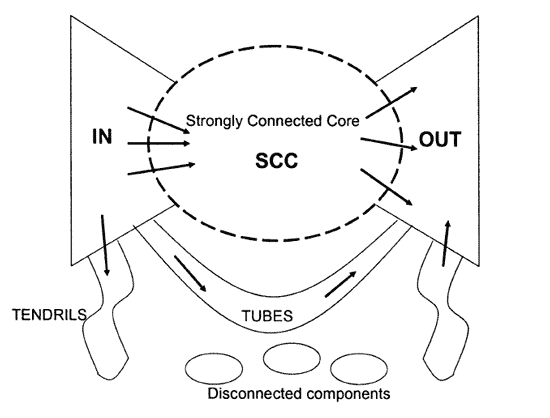
We went through the basic (but ironically, quite complicated) technical structure of the Internet during our first COM125 class. It's certainly comprehensive, but what I think we kinda missed out on is the GRAPHICAL STRUCTURE of the Internet.

So tada here it is!


http://www.congo-education.net/wealth-of-networks/figure-7-5.gif


The Internet, or so many claim, is shaped like a bow.

1. SCC - large central core of websites
2. Peripheral websites - linked to/from SCC
3. Tendrils and Tubes - slightly more "ulu" websites linked to/from peripheral websites
4. Note: Tubes link to/from Tendrils, but not to the SCC itself!
5. Disconnected components - isolated websites
6. Note: within disconnected components, there may be smaller bows and SCCs!

If I had to give examples of sites in each section above, it would be as follows...

1. SCC - CNN, Facebook
2. Periphery linking in to SCC - personal sites like, uhh, Xiaxue's blog!?
3. Periphery linked from SCC - small, specialised sites like online fishing magazines
4. Tubes linking periphery - academic sites
5. Disconnected components - this blog, haha! Cos I'm not linking in/out.

Very "cheem" on first impression, but I think it's not a bad thing to be able to mentally place websites from the Internet on this graphic map in your head! It gives you clues as to what traits to expect from these websites, and of course, how to go about finding them. =D